A Room to Grow Preschool has two locations in Kauai, and provides an interactive preschool environment for children between 2.8 years-old and 6 years old.
The preschool's main (and only) online presence was a Facebook page for the school. The director of the preschool realized they needed a more appropriate digital face for the school. As such, I was brought in as a UX and UI designer to design and build the school's first website.
The Company


Project Overview
Project Overview
Project Duration:
April to June 2022
!
The Problem
As one of the top preschools in the area, A Room to Grow has a relatively large roster of children at both of their locations.
Although their company was growing and expanding, their digital face had not been updated in many years. The school's primary - and only - online interface was the school's facebook page. Although useful for social media purposes, Facebook is not an ideal platform to hold the position of a company's sole digital interaction portal.
Because of the lack of a proper digital portal for their business, parents of current students at the school, as well as potential parents shopping around for information on preschools, were finding it difficult to get accurate information from and/or about the school.
The school brought me on to perform UX research, UX design, and UI design for a full website for their school.
My Role
On this project, I was the sole UX/UI Designer as well as the UX Researcher. Additionally, after the UX portion of the project was complete, I built the website for the school on Wix.
The Goal
The goal was to create a fully responsive website built around the needs of the primary users (the parents of current students), and the secondary users (parents seeking information about the school in order to make an informed decision as to whether or not to attend the school).
Outcomes would ideally encompass greater ease of communication and information relaying for the current parents, and an increase of ease for potential parents to be able to find out thorough and up-to-date information about the school.
The benefit for the company would involve a greater level of visibility to acquire new students as well as dealing with less frustration in communication and information dissemination with the parents of current students.
Responsibilities
-
User Research
-
Data Analysis & Synthesis
-
Wireframing
-
Prototyping
-
Usability Studies
-
Iterative Designs
-
Accessibility Considerations
-
Responsive Platform Design
-
User-Centered Design
Understanding
the User
User Research
Personas
Problem Statements
User Journey Maps
Understanding
the User
User Research
Personas
Problem Statements
User Journey Maps
User Research: Summary
User Research: Summary

Since vaccination is a local, national, and global subject, the research for this particular project spanned byond just the user research interviews performed by me. For user research on this project, I also pored over data, reports, statistics, and interviews collected by other entities such as the WHO, CDC, and various hospitals in regard to vaccination, and why people do or don't get vaccinated.
Through the collection of interviews and data gathered by these other entities and by me, a clear picture of certain pain points became apparent in regard to users and vaccinations.
I took the information collected from the interviews, studies, and databases, and laid out an affinity diagram and built empathy maps. The research - along with the visual aids I constructed - identified a pattern of pain points that were shared at the local, national, and global levels.
There were users who were extremely pro-vaccination, but had a difficult time in understanding what vaccines were and were not relevant to them specifically. Additionally figuring out requirements of age, spacing, health status...etc. in order to qualify for certain vaccinations was also a point of confusion for users. This desire for clearer information spread from general vaccination into the realm of COVID-19 vaccinations as well, as people tried to figure out changing guidelines for booster shot spacing and for testing.
A large swath of the vaccine-hesitant users had trust issues with the health system in general, and with the administration of vaccines specifically. A history of medical experimentation on indigenous people, immigrants, and people-of-color lead many users to distrust the medical system, and feel hesitant to allow that system to inject their bodies with anything. The quick nature of the COVID-19 vaccine creation made many of the hesitant users uneasy with fears of laxed safety and testing.
Another group of vaccine-hesitant users chocked up their lack of vaccination to anxieties like fear-of-needles, fear-of-side-effects, fear-of-vaccines in general.
User Research: Affinity Diagram
User Research: Affinity Diagram


User Research: Pain Points
User Research: Pain Points
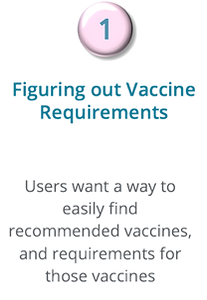
1
1
TBD
As one of the top preschools in the area, A Room to Grow has a relatively large roster of children at both of their locations.
2
2
TBD
As one of the top preschools in the area, A Room to Grow has a relatively large roster of children at both of their locations.
3
3
TBD
As one of the top preschools in the area, A Room to Grow has a relatively large roster of children at both of their locations.
4
4
TBD
As one of the top preschools in the area, A Room to Grow has a relatively large roster of children at both of their locations.
User Research: Personas
User Research: Personas


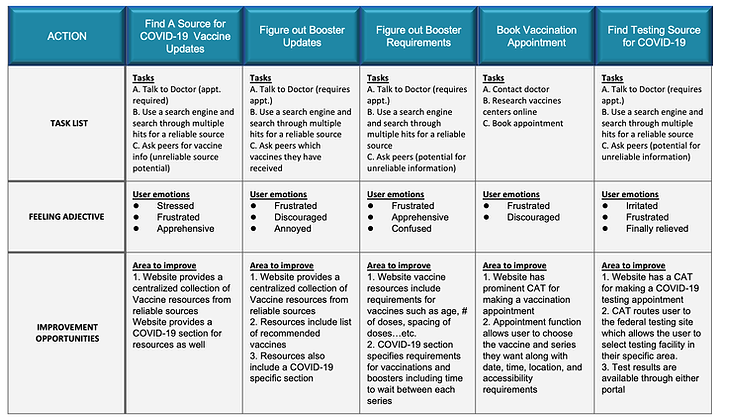
User Research: User Journey Maps
User Research: User Journey Maps




Starting the
Design
Paper Wireframes
Digital Wireframes
Low-Fidelity Prototype
Starting the
Design
Paper Wireframes
Digital Wireframes
Low-Fidelity Prototype
Starting Design: Site Map
Starting Design: Site Map
Moving forward with the information collected from the user research, I constructed a site map to begin laying out a basic outline of the responsive website.
.png)


.png)
Paper Wireframes
Paper Wireframes


Digital Wireframes
Digital Wireframes





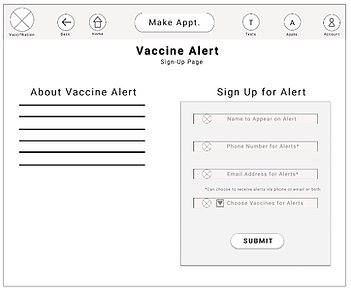

Low-Fidelity Prototype
Low-Fidelity Prototype


View the Full Prototype:
Lo-Fi DESKTOP Prototype

View the Full Prototype:
Lo-Fi MOBILE Prototype
Refining the
Design
Usability Study Findings
Mockups
High-Fidelity Prototype
Accessibility
Refining the
Design
Usability Study Findings
Mockups
High-Fidelity Prototype
Accessibility
Usability Study: Findings
Usability Study: Findings


Mockups
Mockups


Mockups
Mockups


View the Full Prototype:
Hi-Fi DESKTOP Prototype

View the Full Prototype:
Hi-Fi MOBILE Prototype